Best Practices for Git and Git Workflow
A complete guide to understanding Git workflows, when to use merge or rebase, and practical tips for keeping your repository clean and efficient.
Best Practices for Git and Git Workflow
Git is the backbone of modern software development. Whether you work solo or in a large team, understanding how to structure your Git workflow can mean the difference between effortless collaboration and daily merge conflicts.
This guide covers Git workflows, branching strategies, merge vs rebase, and best practices for maintaining clean, reliable repositories.
🔧 Why a Good Git Workflow Matters
A well-structured Git workflow provides:
- Consistency — Everyone follows the same conventions.
- Traceability — Every change is easy to understand and revert.
- Collaboration — Merging, reviewing, and deploying code is frictionless.
- Stability — Production code remains stable while development moves fast.
🧭 Common Git Workflows
Different teams adopt different workflows depending on project scale and CI/CD maturity.
Feature Branch Workflow
Ideal for small to medium projects.
# create a new branch for your feature
git checkout -b feature/user-auth
Once your feature is complete:
git push origin feature/user-auth
# open a pull request to main/develop branch| Pros | Cons |
|---|---|
| Clean, isolated work. | Requires discipline to delete merged branches. |
| Easy code reviews. |
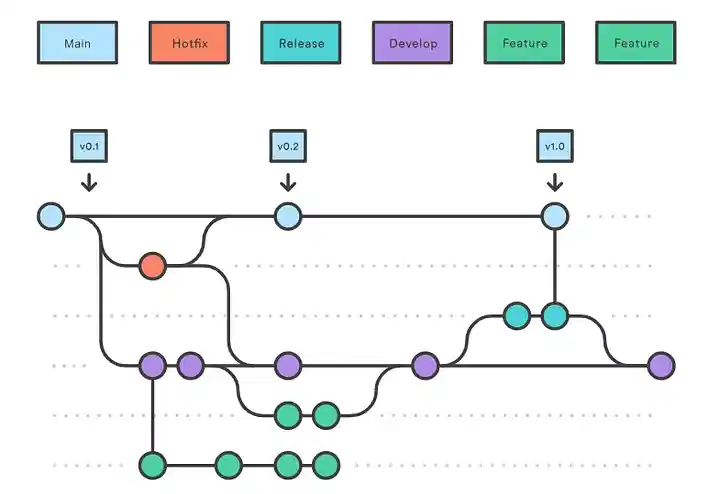
Gitflow Workflow
A structured approach with dedicated branches:
main— production-ready codedevelop— integration branch for new featuresfeature/*— new featuresrelease/*— pre-production testinghotfix/*— emergency fixes
gitGraph
    commit id: "Init"
    branch develop
    commit id: "Feature A"
    branch feature/login
    commit id: "Work on login"
    checkout develop
    merge feature/login
    branch release/1.0
    commit id: "Prep release"
    checkout main
    merge release/1.0
    commit id: "Hotfix"
    branch hotfix/1.0.1
    commit id: "Fix issue"
    checkout main
    merge hotfix/1.0.1
| Pros | Cons |
|---|---|
| Great for larger teams or staged deployments. | Can feel heavy for smaller teams. |
| Clear separation of production and development work. | Requires discipline to delete merged branches. |
Trunk-Based Development
A modern, CI/CD-friendly approach.
- Developers branch off
main(short-lived branches) - Frequent commits and merges (often daily)
- Automated tests ensure stability
git checkout -b feat/add-search
# work fast, commit often, merge quickly| Pros | Cons |
|---|---|
| Encourages fast iteration and continuous delivery. | Requires robust testing and CI pipelines. |
| Reduces long-lived branch drift. |
⚔️ Merge vs Rebase
Two powerful ways to integrate changes — each with tradeoffs.
🔹 git merge
Merges one branch into another, preserving history.
git checkout main
git merge feature/auth
Creates a merge commit, which explicitly records branch history.
🔹 git rebase
Moves (or “replays”) commits on top of another branch.
git checkout feature/auth
git rebase main
This rewrites history, making it look like all work happened sequentially.
When to use merge vs rebase
| When to use merge | When to use rebase |
|---|---|
| Working in teams | Working solo |
| Keep branch history visible | You want a linear commit history |
| You want accurate audit trail | You prefer linear, simplified history |
🧠 Best Practices for Git Excellence
| Category | Recommendation |
|---|---|
| Commit Messages | Write concise, meaningful messages (e.g., fix: handle null user or feat: add search filters). |
| Branch Naming | Use clear, consistent names like feature/, fix/, chore/, docs/. |
| Pull Requests | Keep PRs small and focused — easier to review and test. |
| Reviews | Use PR templates to enforce consistency and quality. |
| Releases | Tag versions (e.g., v1.0.3) and use CHANGELOG.md. |
| Automation | Add pre-commit hooks (e.g., lint, test) using Husky or Lefthook. |
| Clean-up | Delete merged branches regularly. |
🪄 Pro Tips from Real Projects
-
Squash commits before merging: Keeps history clean and meaningful.
git rebase -i HEAD~3 -
Use
git stashwisely: To save uncommitted work temporarily.git stash push -m "WIP: login refactor" -
Leverage Git aliases: Speed up your workflow. Example in
~/.gitconfig:[alias] st = status co = checkout cm = commit -m lg = log --oneline --graph --decorate -
Protect your main branch: Enforce PR reviews and passing CI checks before merge.
🧩 Final Thoughts
There’s no one-size-fits-all Git workflow. Your ideal setup depends on your team size, release cadence, and deployment process.
- Small teams → Feature branch or Trunk-based
- Large teams → Gitflow
- Fast CI/CD setups → Trunk-based with frequent merges
The goal is clarity, collaboration, and stability — not just fancy branching.